Computer visionJanuary 2026 - April 2026
VisionEditCV
AI-Powered Image Segmentation & Editing with SAM3
System Overview
VisionEditCV uses SAM3 masks to edit selected objects or backgrounds in a C# .NET 8 desktop application.
A FastAPI service on a hosted NVIDIA T4 handles segmentation, while EmguCV processes masks and effects locally. Users select regions by text or bounding box, preview edits, and save images.
How it actually works
From prompt to edited pixels
Walk the real pipeline from waking the hosted SAM3 server to saving a full-resolution edit, with the app's own code and screenshots at each step.
Things to try
- In 1 Wake, switch to Hangs until timeout and compare the attempts.
- In 4 Effect, pick Pixelate and blur and drag Intensity.
- In 6 Save, drag Split or press Show before.
Built from the project's own code and documents.from code: A constant or rule copied from the project's repositoryfrom report: A value from the project's report or presentationsimulated: Computed in your browser by running the project's logic
How it works
Make model-generated selections usable in a desktop editor.
- 1
Describe the selection
Load a static image and provide a text prompt or positive and negative bounding boxes to identify regions for segmentation.
- 2
Request masks
Check server readiness, send the Base64 image to the matching FastAPI endpoint, and receive masks in a JSON response.
- 3
Preview an effect
Choose masks and effect settings, then preview color grading, stylization, stickers, portrait blur, pixelation, or grayscale.
- 4
Compare and save
Compare the edit with the original and apply the active effect to a cloned working image before saving PNG or JPEG output.
Project Demo
The project's own demonstration footage.
Engineering features
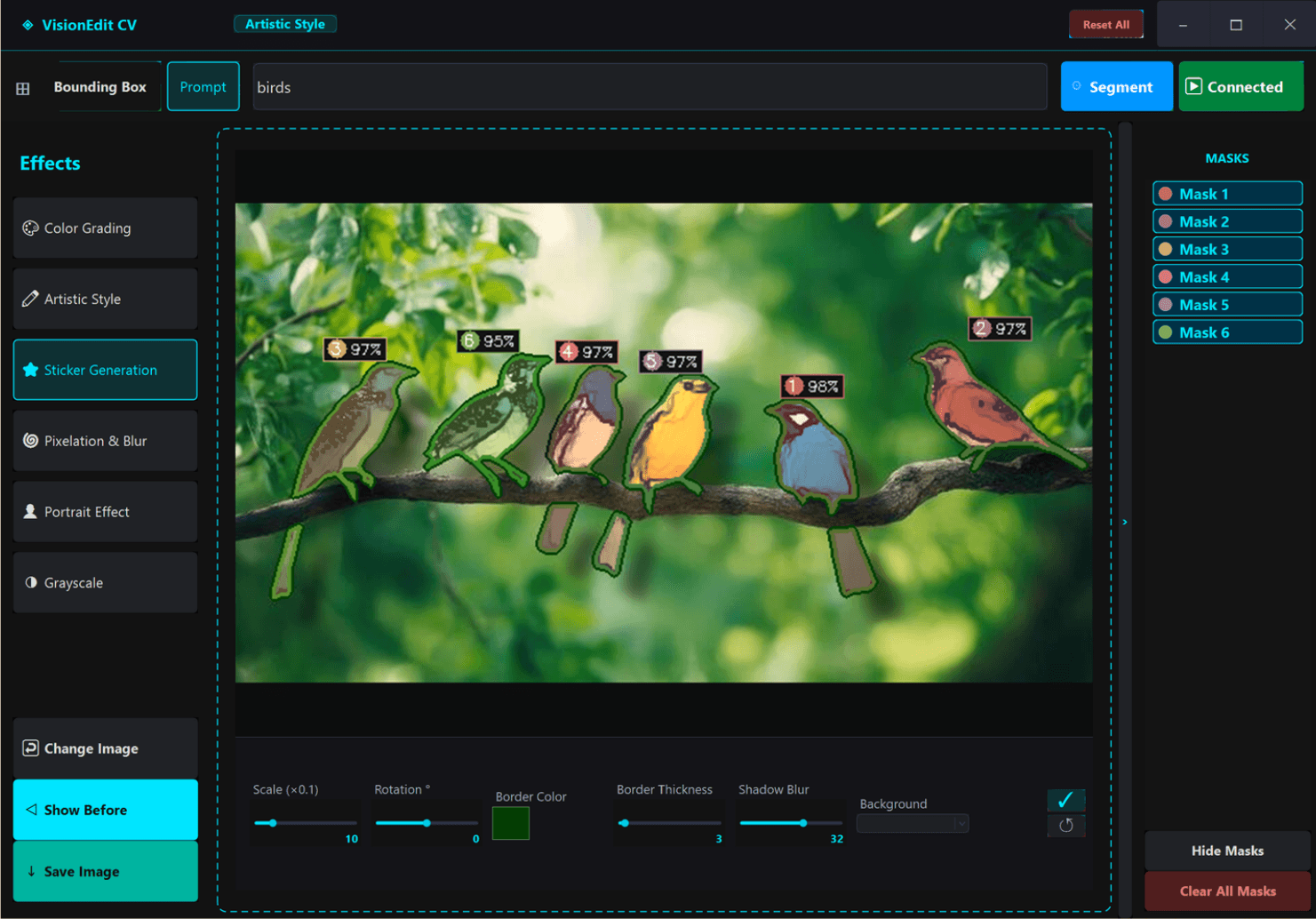
Interactive object segmentation using SAM3 with text prompt or bounding box support.
Diverse effect suite including Sticker Generation, Artistic Stylization, and Portrait Bokeh.
Custom-programmed .NET 8 WinForms UI with a modernized, sleek dark aesthetic.
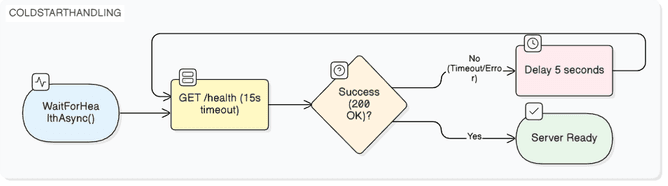
Remote segmentation on a hosted NVIDIA T4 through Lightning.ai, with the client polling a health check until the model is ready.
Preview system that downscales heavy effects to a 900 px long side while editing, then renders the full-resolution image on save.
Inside the build
The control logic, integration and design decisions, one note at a time.
01Remote inference with readiness handling
The backend exposes separate endpoints for text and bounding-box segmentation. The client polls GET /health until it receives HTTP 200 before sending image data. This readiness check accommodates model loading on the hosted GPU rather than treating the initial server startup as an ordinary inference request.
02From probability masks to editable regions
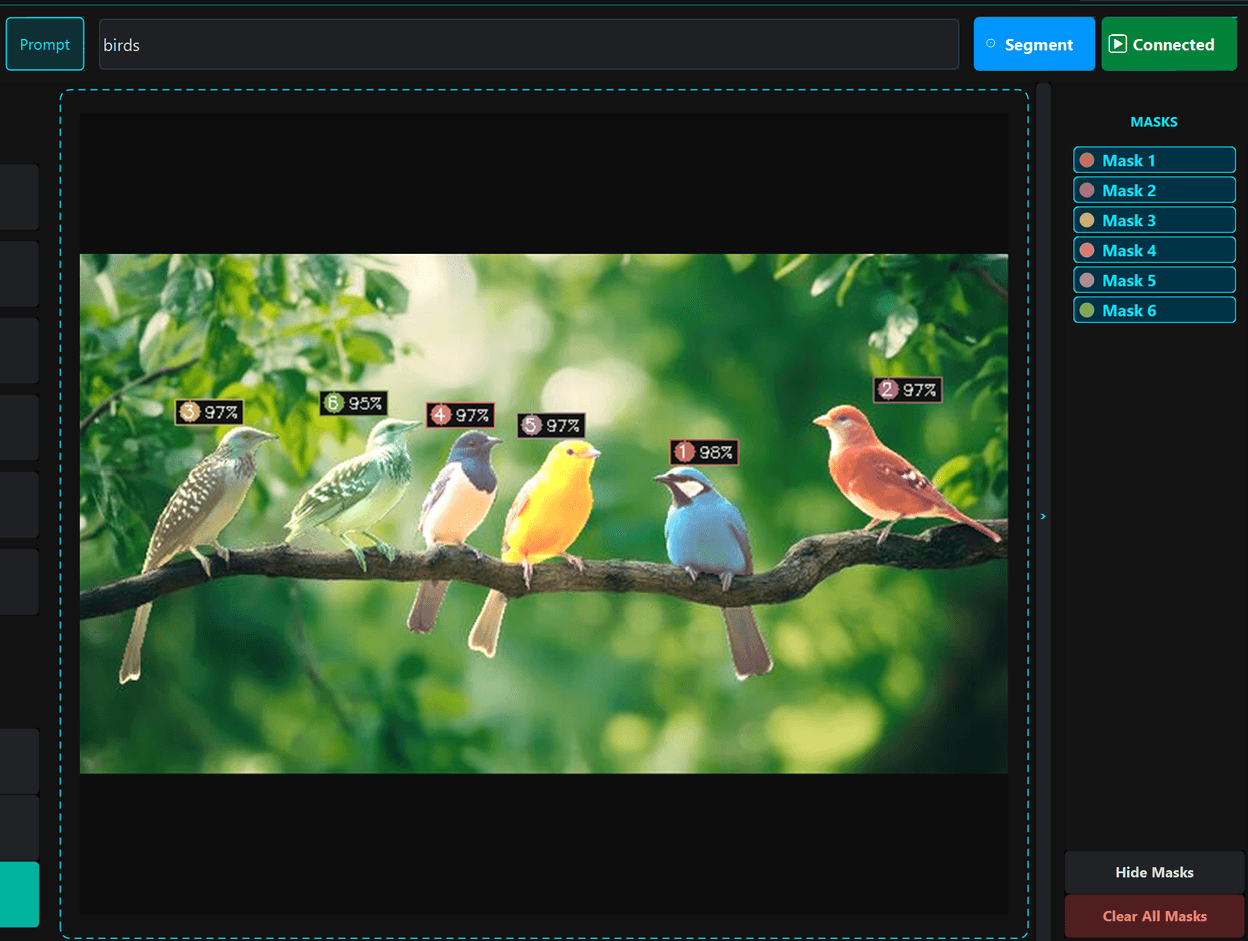
Returned mask arrays are wrapped as floating-point EmguCV matrices, resized to the input image, thresholded, and converted to byte masks. The overlay blends mask colors, draws contours, and labels selections with confidence scores. Portrait processing uses a feathered mask to blend sharp and blurred image regions.
03Preview processing and image ownership
Effect settings are captured on the UI thread before asynchronous work, and processing operates on image clones. Heavy previews limit the longest side to 900 pixels and scale effect kernels accordingly. Saving applies the active effect to a cloned working bitmap, keeping file export separate from the displayed canvas.
Build artifacts
Figures taken from the project's own report or presentation.
Evidence & limitations
What the project documents show, and where each claim comes from.
Documented selections and editing pipeline
The presentation includes screenshots of prompt and box selections, individual editing effects, and comparison controls. Its methodology and flowcharts document API requests, mask conversion, effect processing, and saving; the conclusion reports a working SAM3-based photo editor.
- VisionEditCV project presentation
PDF pages 5-25: interface and implementation; 30, 36: blending and saving; 41-42: limitations and conclusion.
- VisionEditCV source repository
- Project demonstration
Linked from the supplied portfolio.
Project Resources
The original documents behind this case study.
Hiring for robotics or embedded work?
I'm looking for internships. The résumé has the short version.